Difference between IPv4 and IPv6: What MSPs need to know
Difference between IPv4 and IPv6 explained for UK MSPs and WiFi partners: addressing, NAT, security, routing and a safe migration path.
What is network access control? A plain guide to NAC enforcement, deployment, integrations and metrics for UK MSPs and IT teams.
A review lands on your desk and one question stops the meeting. How many devices are on the staff network right now?
You pull the client list from the controller. Half the names are laptops you know. The rest include a phone belonging to someone who left in March, a contractor's MacBook from a project that closed before Christmas, and a printer nobody will claim. Nothing is misconfigured. The network did exactly what it was told to do, which is hand an address to anything holding the password.
That list is the difference between a network that works and a network that is controlled. The fix isn't a stronger password or another SSID. It's a system that asks who is connecting, checks the device, and takes access away when the answer changes.
A phone issued to a member of staff can still join the staff network months after they leave if access depends on a shared key. It may receive an address and reach internal services because the network has no way to distinguish that device from an authorised one.
Network access control (NAC) determines which users and devices can connect, verifies their identity, and sets what they can reach. The Jisc 802.1X implementation guidance explains how wired and wireless networks can use identity to control admission instead of relying on a physical port or shared WiFi key.
An access decision has a lifecycle. It must account for the identity presented at connection time, the device's condition, and changes later, such as an employee leaving or a device no longer meeting policy. If directory status changes but the network does not revoke access, authentication has only checked the connection once.
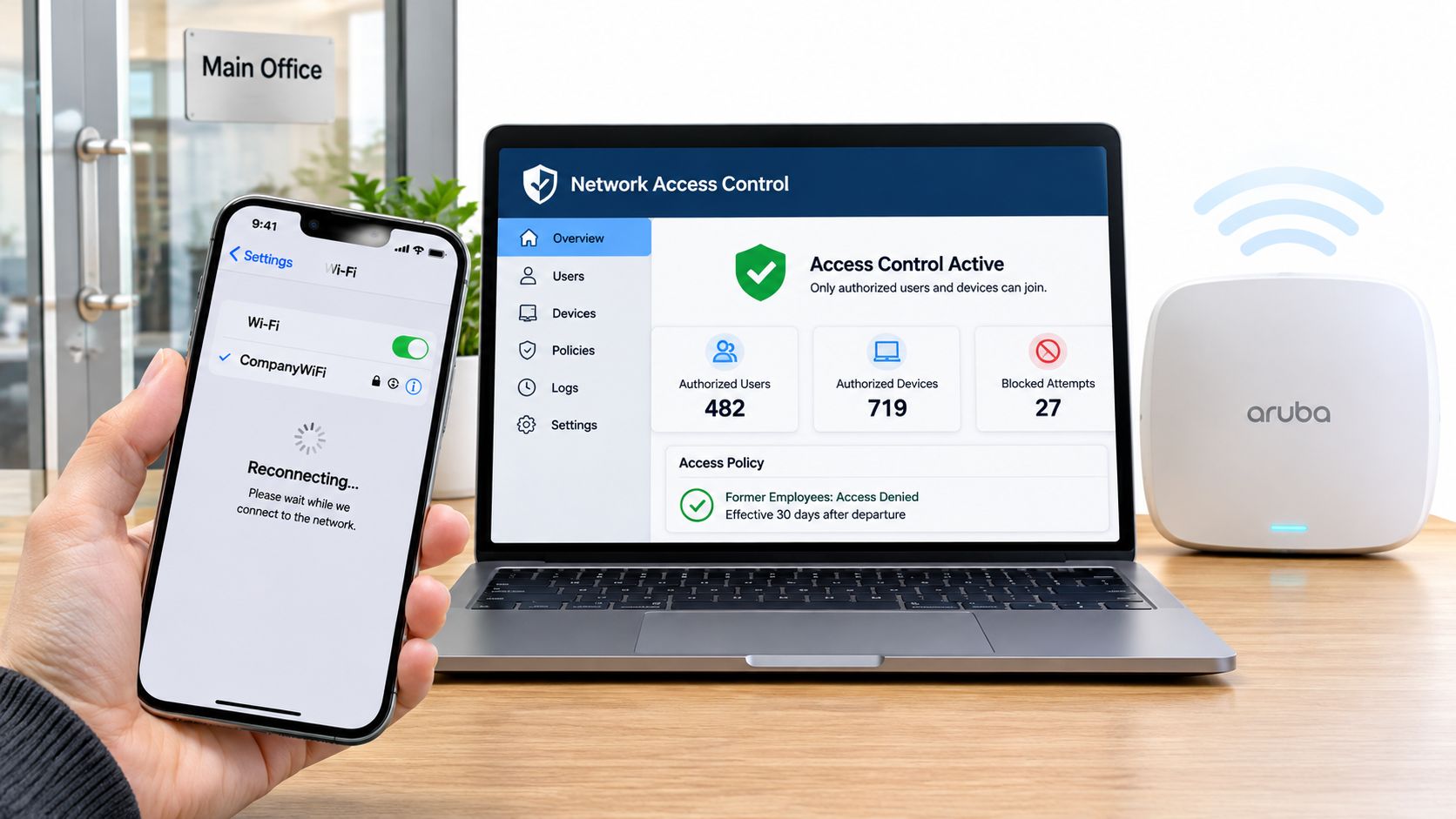
NAC policy boils down to three decisions:
IEEE 802.1X was developed in the late 1990s and later approved as an IEEE standard, and it uses the Extensible Authentication Protocol (EAP) to make a device or user prove identity before a switch port or wireless network grants normal access.
The architecture has three parts: a supplicant on the endpoint, an authenticator such as a switch or access point, and an authentication server, usually RADIUS. Together, they let the network base admission on identity rather than the physical port or a shared WiFi key.
A separate staff SSID or guest network limits where traffic can go. On its own, it does not establish who is connecting, whether the device is authorised, or when access should end. A useful NAC design therefore considers unmanaged devices and revocation alongside the initial connection decision.
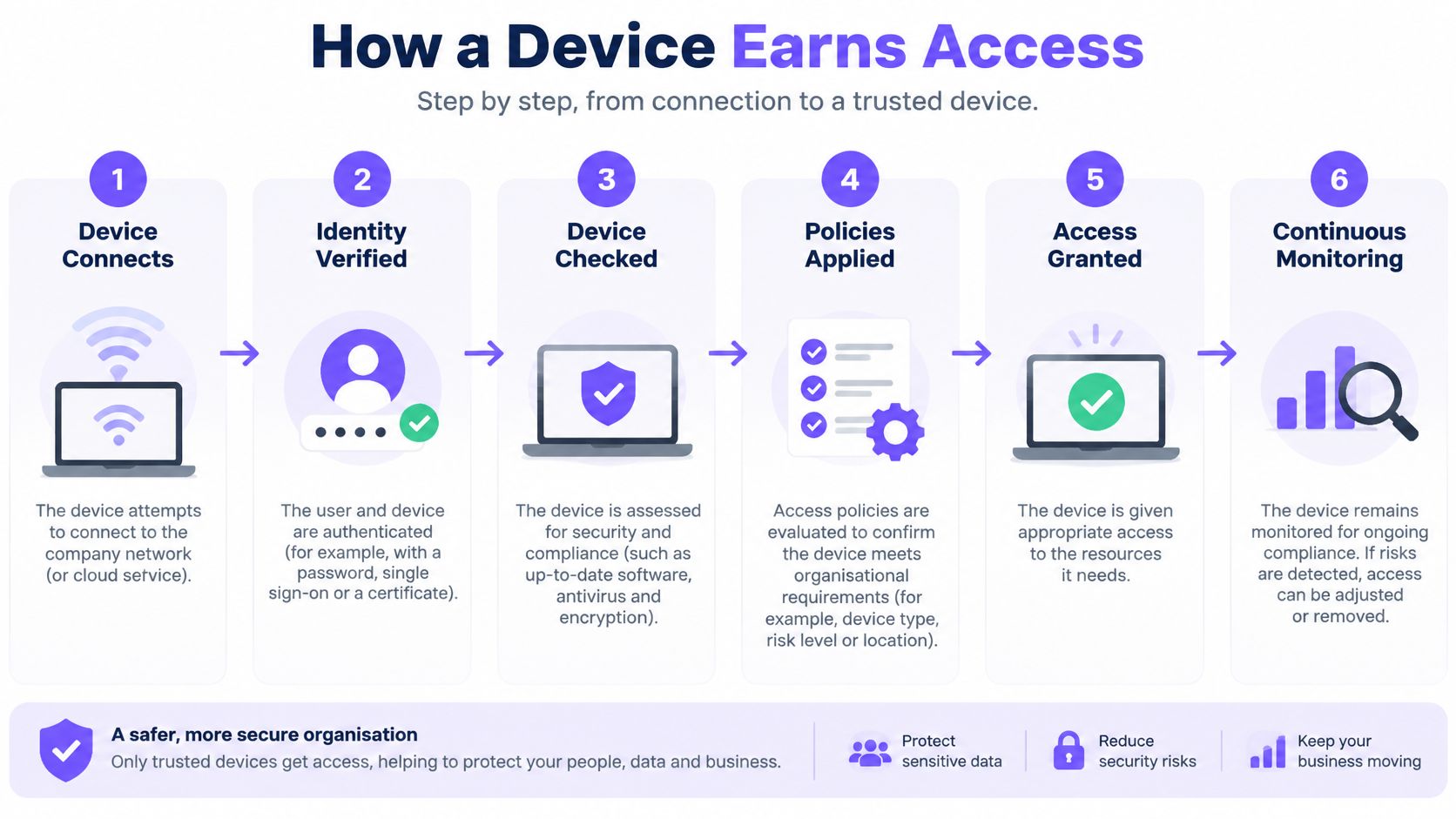
The admission sequence is the same on a wired port and on a wireless network. The details differ, the order doesn't.
The final step deserves more attention than it usually gets. Access that can be revoked automatically the moment directory status or device posture changes behaves differently from access granted once at 9am and never rechecked.
| Method | How it identifies the device | Best suited to | Main limitation |
|---|---|---|---|
| 802.1X | Certificate or user credentials via EAP and RADIUS | Managed staff laptops and corporate devices | Each device needs a supplicant and a valid certificate |
| MAB (MAC Authentication Bypass) | MAC address checked against an allow list | Printers, sensors, cameras and other devices without software | MAC addresses can be spoofed, so identity is weak |
| Captive portal | User accepts terms or signs in on a web page | Guests and visitors on shared or open WiFi | Adds a sign-in step and cannot serve automated devices |
| Posture check | Scans patch level, antivirus and disk encryption | Enforcing health standards on managed devices | Needs an agent or integration, and strict rules can quarantine a whole fleet |
802.1X gives you the strongest identity because a certificate is hard to share and easy to revoke. It fails the moment a certificate expires, which is why certificate lifecycle management matters more than most rollouts admit.
MAB exists for the devices that will never run software. A door controller or a label printer can only present a MAC address. Treat it as a name tag, not a passport, and put those devices on a segment that can reach their server and nothing else.
Captive portals suit people, not machines. A visitor can tick a box and get online. A smart TV cannot, and neither can a building management gateway. If you put IoT devices behind a portal, expect a support ticket.
Posture checks are where policy ambition meets operational reality. Requiring encryption on managed laptops is reasonable. Requiring it on every device in the estate will quarantine the sales director's three-year-old Windows machine an hour before a client meeting, and you'll be the one explaining it.
Most estates end up combining methods, and that's correct. Staff on 802.1X with certificates, fixed equipment on MAB, visitors through a portal, posture checks on the managed fleet only.
Practical rule: Ask of any device, can it run software or hold a certificate? If the answer is no, it needs MAB or a portal, and it should get a narrower role than anything a person uses.
Two decisions shape a deployment more than any vendor feature list. How does NAC see a device, and where does enforcement sit? Get these wrong and you'll spend the first six months firefighting lockouts instead of closing gaps.
| Pattern | How it works | Suits | Trade-off |
|---|---|---|---|
| Agent-based | Software on the endpoint reports identity and health | Managed fleets that need posture depth | Gaps for personal and unmanaged devices |
| Agentless | Network signals identify devices without installed software | Guests, IoT and unmanaged devices | Limited view of device health |
| Inline | Enforcement point sits in the traffic path | Single site with controlled switching | Single point of failure unless made redundant |
| Overlay | Policy layered over existing switches and access points | Multi-site estates and mixed hardware | Depends on integration with existing equipment |
Agent-based tooling tells you a great deal about a laptop you own and nothing at all about a resident's iPad. Agentless profiling covers everything that appears on the network, which is usually the larger and less understood population. Most mature estates run agentless for breadth and agent-based checks for the managed staff fleet, accepting that the two views won't always agree.
Inline enforcement is the simplest thing to reason about. Traffic passes through the box, and the box decides. It is also a dependency: if that enforcement point goes down without a redundant pair, a whole site loses connectivity and the phone calls start. Overlay approaches avoid that by layering policy over the switching and wireless you already run, which is the pragmatic choice for estates spread across many sites and several hardware vendors.
Containment is where the technical value shows. The NCSC network security fundamentals guidance describes segmentation as dividing a network into smaller networks so traffic between them can be explicitly controlled, and makes the case for allow-list rules over block lists when enforcing least privilege.
Apply that concretely. A guest device gets internet access and no route to internal applications. An unmanaged staff endpoint lands in remediation until it meets policy. A compromised laptop is denied east-west traffic even while its credentials are still valid. Each of those is a decision the network makes, not a decision a user makes.
What I'd do: Start agentless to get visibility across the whole estate, add agent-based posture checks for managed staff devices once you know what's actually out there, and choose an overlay if you run many sites or more than two hardware vendors.
A NAC deployment that isn't wired into anything is a expensive allow list. Three integrations turn it into a control that runs itself.
Group membership, account status, and role all come from Active Directory, Entra ID, Google, or Okta. This is what makes joiner and leaver handling automatic. A new starter added to the right group gets the right network access on first connection. A leaver whose account is disabled loses it at the next authentication, provided the connection re-checks.
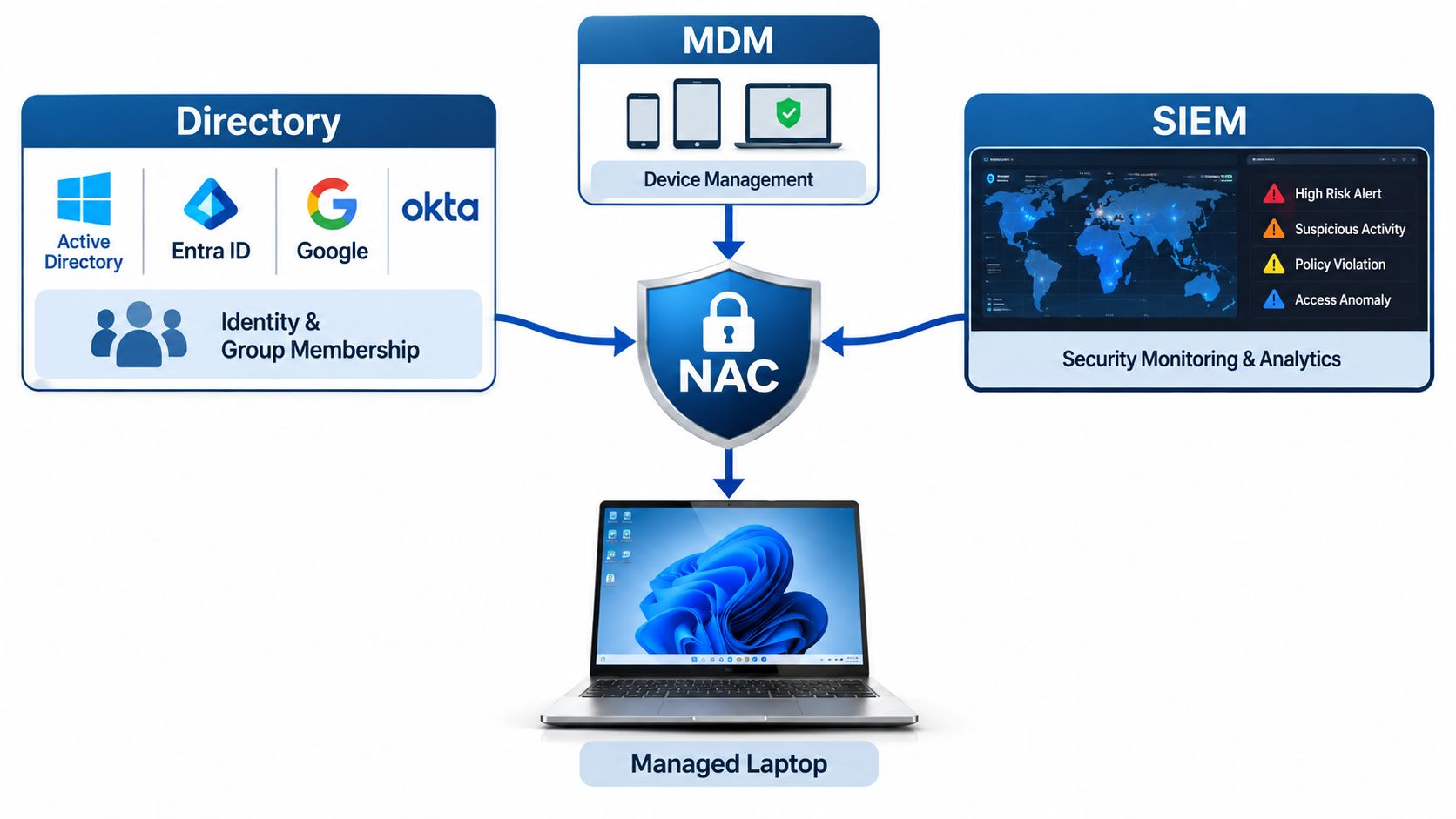
Ownership and compliance state come from mobile device management. Only enrolled, encrypted, patched devices should receive staff access. Enrolment is also the moment you can push a certificate rather than a password, which is why certificate-based WiFi enrolment through MDM removes an entire category of help-desk call.
Every authorisation decision should land in a SIEM. Not for the dashboard, but for the incident where you need to know which device was on which segment at 02:14 on a Sunday.
The UK NCSC zero trust architecture design principles recommend authorising each request against policy and evaluating several signals together, including user identity, authentication strength, device health, location and behavioural risk. An internal IP address or a desk in the right office is not one of those signals.
Follow one failure through the pipeline. On Monday morning an employee's laptop fails an MDM compliance check because a patch didn't apply. NAC places it in a remediation network with access only to the update service. The SIEM records the quarantine event and the device identifier. The user runs the update, reconnects, passes the check and lands back on the staff VLAN. Nobody calls the help desk, and the sequence is auditable.
The common mistake is connecting the directory but not the revocation path. Accounts get disabled, and devices with cached credentials keep working for weeks. Before you integrate anything, map the data you need: exact group names, the device owner field in your MDM, which certificate authority issues device certificates, and how long your SIEM retains authentication logs.
The access rule for each population should be boring and predictable. Most failures come from treating all of them as one audience with one SSID.
| Scenario | Access rule | Business value |
|---|---|---|
| Guest WiFi | Internet only, time-limited, portal or app sign-in | Safe visitor access and sign-in data without any route to internal systems |
| Staff WiFi | Directory-driven group access, bound to the device and revoked automatically | Faster joiners and leavers and fewer lockouts |
| Contractors | Scoped segment with an expiry date set at approval | Limits exposure from third-party access |
| Multi-tenant (student, build-to-rent, MDU) | Private network per unit, isolated from neighbours | Fewer disputes and support calls, and a private at-home experience |
Now the uncomfortable number. The 2025 Cyber Security Breaches Survey found that 43% of UK businesses, approximately 612,000 organisations, reported a cyber security breach or attack in the previous 12 months.
That figure supports an argument you'll need to make to clients repeatedly. Perimeter defence is not the whole job. Staff who authenticate correctly still need access that fits their role, their device and their location, and that access has to be withdrawn when circumstances change. The same survey's technical report found that only 47% of businesses used identity and access management controls, with 40% reporting the practice a year earlier. The gap between needing identity controls and running them is where most of your pipeline sits.
The value logic is straightforward once you stop selling it as a WiFi upgrade. Automated joiner and leaver handling cuts password resets and kills stale accounts. A guest journey that captures a name and an email gives the venue something back while keeping visitors off internal systems. Per-unit isolation in student accommodation or build-to-rent stops one resident's infected laptop from reaching a neighbour's devices, which is the sort of incident that ends up in a complaint rather than a ticket.
Build the case from your own numbers, not a vendor slide. Count current help-desk tickets for access requests, count accounts still active after their end date, and estimate the share of guest traffic that could be isolated from internal systems.
Separate staff and visitor WiFi sounds like a solved problem. It isn't durable on its own. The 2025/26 Cyber Security Breaches Survey reported that 93% of large businesses had separate staff and visitor WiFi in 2024/25, and that figure fell to 85% in 2025/26. A configuration that drifts backwards under operational pressure is not a control.
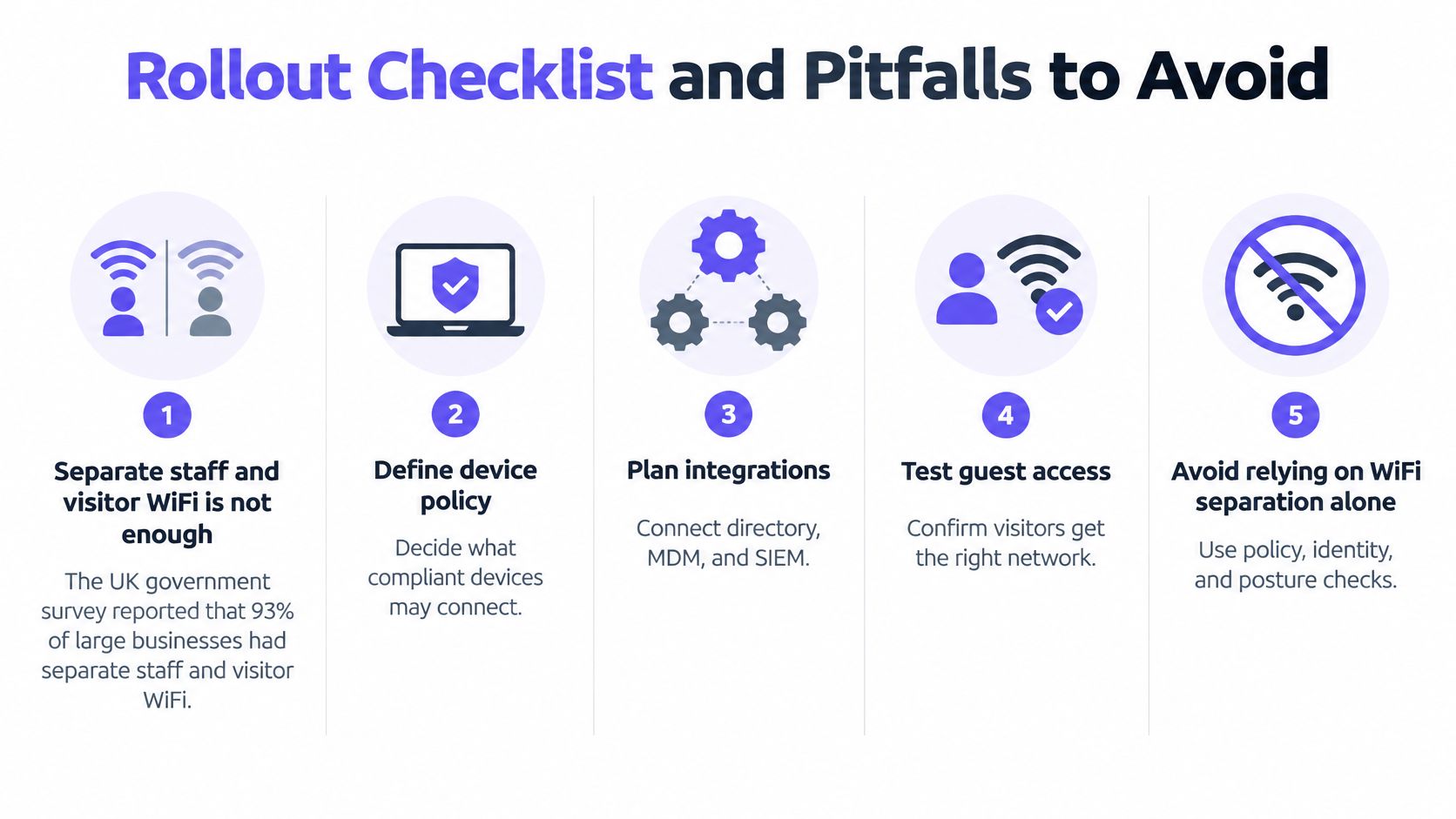
Expired certificates are the classic outage. A laptop's certificate lapses, the supplicant fails without warning, and the user reports "the WiFi is broken". Fix it with automated certificate renewal and monitoring that flags expiry 30 days out.
MAB treated as strong identity is the quiet risk. Anyone who can read a MAC address off a label can clone it. Keep those devices off segments that touch personal data.
Captive portals blocking IoT produce the support calls nobody enjoys. Smart TVs, games consoles and building systems can't complete a web sign-in. Give them their own key or their own network.
Posture rules strict enough to quarantine a whole fleet usually appear in week two. Roll out in monitor-only mode first, look at what would have been blocked, then enforce.
Forgotten devices are the ones that generate the escalation. Printers, cameras and lift controllers were talking happily for years and suddenly can't.
A working rollout is unremarkable. Staff connect without noticing, guests sign in without help, and a leaver is removed the same day. If you're pairing this with wider wireless work, the guide to securing a WiFi estate covers the access point side of the same problem.
Connected-device count is the metric everyone reports and the one that tells you least. It measures how many endpoints are present, not whether any of them should be. A network with 400 devices and correct policy is healthier than one with 380 devices and a stale account from a contractor who finished in June.
| Metric | What it reveals | Review cadence |
|---|---|---|
| Unauthorised connection attempts blocked | Whether enforcement is catching bad connections | Monthly trend, investigate spikes |
| Policy evaluation latency | Whether checks slow down sign-in | Monthly, alert on sustained rises |
| Quarantine time | How fast non-compliant devices are fixed | Weekly during rollout, then monthly |
| Stale accounts revoked | Whether leavers lose access on time | Monthly, against the HR leaver list |
| Permitted pathways per device role | Whether least privilege still holds | Quarterly rule audit |
Read movement, not absolutes. A jump in blocked attempts might be an attacker, and it might be a broken client configuration after a Windows update. Check which before you put it in a report. Rising evaluation latency is the early warning that the policy engine or the directory link is struggling, and you'd rather see it on a graph than hear it from a user. Long quarantine times almost always point to a slow remediation process or an unclear message on the remediation page, not a technical fault.
Stale accounts deserve their own line in the monthly review. Count them against the HR leaver list and aim for zero accounts active past their end date. Auditing permitted pathways per role every quarter is how you catch the temporary rule someone added in a hurry and nobody removed.
The Cyber Security Longitudinal Survey found that 97% of UK businesses reported restricting IT administration and access rights to specific users, and 95% of charities reported the same. The rule is nearly universal. Proving it holds on a Tuesday afternoon is the harder part, and that's what these five numbers give you.
Pair every security metric with help-desk ticket volume. If enforcement tightens and tickets climb with it, you've built friction rather than control.
Judge any platform on five criteria and ignore the rest of the feature matrix until those are answered.
Then ask the question that separates working deployments from demonstrations. When a directory account is disabled, does access revoke by itself, and how quickly? If the answer involves a scheduled script, a help-desk ticket, or a person remembering, keep asking.
The market logic supports the pitch. The Cyber Security Sectoral Analysis 2025 records that identification, authentication and access control represented 29% of the UK cyber security sector taxonomy, covering products and services that control user access through passwords, biometrics and multi-factor authentication. Sell into that category and you're talking about identity, not bandwidth.
Purple is one platform to test against those five criteria. Staff WiFi runs on WPA3-Enterprise with automatic device provisioning and revocation tied to the customer's identity provider, through the Purple app, with no shared passwords. It works with Entra ID, Google and Okta, and deploys on existing infrastructure from Cisco, Cisco Meraki, HPE Aruba Networking, Ruckus Networks, Extreme Networks, Juniper Mist and Ubiquiti, so the switches you've already sold stay in place.
Start this month. List your current SSIDs, map each one to a directory group, and run a pilot at a single site with one fallback for devices that can't authenticate.
Purple gives you the identity layer underneath all of this, with Staff WiFi on WPA3-Enterprise and certificates provisioned and revoked through your customer's directory, Guest WiFi with a branded captive portal and built-in analytics, and multi-tenant networking that gives every resident a private network in their own app. All of it runs as a hardware-agnostic overlay on the access points your clients already own, so you're not asking them to replace infrastructure to gain control of it. Visit Purple to see how the partner programme fits around your existing WiFi portfolio.
Join 80,000+ venues already running on Purple. No targets, no minimums, just bigger deals.